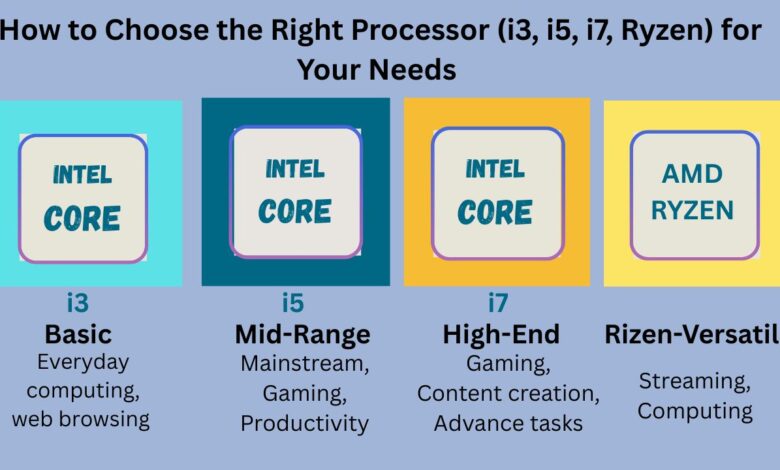
How to Choose the Right Processor (i3, i5, i7, Ryzen) for Your Needs
Choose the Right Processor (i3, i5, i7, Ryzen) for Your Needs

Choosing the perfect CPU for your laptop or desktop is one of the most important decisions you will ever make when buying a computer. Your processor determines how fast apps load, how smoothly your system runs, how well you can multitask, and how long your device stays relevant. Because of this, understanding how to choose the right processor is essential—whether you are a student, office worker, gamer, designer, or casual user.
In today’s market, the most common processors belong to Intel’s i3, i5, and i7 series, along with AMD’s Ryzen lineup. Each processor is designed for a different type of user, performance need, and budget. Although they may look similar at first glance, their performance difference is huge. This detailed 1500-word guide will help you understand each processor’s capabilities and choose the one that perfectly suits your usage.
Why Choosing the Right Processor Matters
Before you understand how to choose the right processor, you must first know why the CPU is so important.
1. System Speed
Every task—opening apps, loading websites, running software—depends on the CPU.
2. Smooth Multitasking
More cores and threads allow you to handle more apps at once without lag.
3. Better Gaming & Creativity
Video editing, 3D design, game rendering, and streaming all require a powerful CPU.
4. Long-Term Reliability
A good processor keeps your system fast for years without needing an upgrade.
5. Energy Efficiency
Modern processors consume less power and improve battery life.
Because the processor affects everything, your choice must be made wisely based on your workload and future needs.
Understanding Key CPU Specifications
To understand how to choose the right processor, you must know the basic CPU terms:
• Cores
More cores = better multitasking and faster performance.
• Threads
Each core handles multiple tasks using threads.
• Clock Speed
Measured in GHz, a higher speed means quicker processing.
• Generation
Newer generations provide improved efficiency, performance, and technology.
• Cache
More cache means faster data access and smoother performance.
Once you know these basics, it becomes easier to understand the differences between i3, i5, i7, and Ryzen processors.
Intel Processors Breakdown (i3, i5, i7)
Intel processors are among the most widely used CPUs in laptops and desktops. They are typically categorized into three main performance levels: i3, i5, and i7.
Intel Core i3 – Basic Yet Reliable
When users want to understand how to choose the right processor, the first category is the Intel Core i3.
Ideal For
- Web browsing
- Watching YouTube/Netflix
- Word, Excel, and basic office work
- Online classes
- General day-to-day tasks
Performance Level
i3 processors offer moderate performance, low power consumption, and smooth basic usage. They are perfect for users who don’t run heavy software or demanding applications.
When to Choose i3
Choose an i3 processor only if your tasks are simple and budget is a major priority.
Intel Core i5 – The Best All-Rounder
Among Intel’s lineup, the i5 is the most popular processor, and for many users wondering how to choose the right processor, the i5 is the best balance between affordability and performance.
Ideal For
- Multitasking
- Office work and productivity apps
- Programming
- Moderate gaming
- Photo editing
- Light video editing
Performance Level
The i5 offers better speed, more cores, and improved multitasking compared to the i3. It can handle most apps smoothly and lasts longer for future requirements.
When to Choose i5
If you want a future-proof laptop or desktop without spending too much, the i5 is ideal.
Intel Core i7 – For Power Users
The i7 is designed for users who need high speed, advanced multitasking, and strong performance for heavy tasks.
Ideal For
- Gaming
- Professional video editing
- Animation and 3D rendering
- Engineering software (AutoCAD, SolidWorks, MATLAB)
- Streaming
- Running virtual machines
Performance Level
i7 processors are significantly faster with higher core counts, better turbo boost speeds, and stronger graphics. They are perfect for creators, engineers, and gamers.
When to Choose i7
If performance is your main priority and you handle heavy software, choose an i7.
AMD Ryzen Processors – Strong Performance at Better Pricing
AMD Ryzen processors have become extremely popular, offering excellent performance at a lower price. Many users who research how to choose the right processor often find Ryzen to be a better value option.
Why Ryzen Is a Good Choice
- Great for gaming
- Excellent multitasking
- Strong integrated graphics
- More cores at a lower price
- Cooler and more efficient
Ideal Ryzen Models
- Ryzen 3 = Equivalent to i3
- Ryzen 5 = Equivalent to i5
- Ryzen 7 = Equivalent to i7
- Ryzen 9 = Extreme performance for professionals
Ryzen processors shine in tasks like gaming, video editing, and streaming thanks to higher core counts.
Detailed Comparison: i3 vs i5 vs i7 vs Ryzen
| Processor | Performance | Best For | Cores | Budget |
|---|---|---|---|---|
| i3 | Basic | Students, browsing | Low | Low |
| i5 | Mid-range | Productivity, multitasking | Medium | Medium |
| i7 | High-end | Gaming, editing | High | High |
| Ryzen 5/7 | Mid-high | Gaming + streaming | Medium-high | Medium-high |
How to Choose the Right Processor – Step-by-Step Guide
This is where you will truly understand how to choose the right processor based on real-life usage.
1. Identify Your Usage Category
Light Users (Basic Tasks)
Tasks: Browsing, movies, MS Office
→ Choose i3 or Ryzen 3
Medium Users (Multitasking)
Tasks: Editing, programming, occasional gaming
→ Choose i5 or Ryzen 5
Heavy Users
Tasks: Gaming, video editing, 3D modeling
→ Choose i7 or Ryzen 7
Professional Users
Tasks: Workstations, high-end editing
→ Choose i9 or Ryzen 9
2. Check Processor Generation
Newer generations perform better and last longer.
Prefer: 12th Gen, 13th Gen, 14th Gen Intel or Ryzen 5000, 6000, 7000 series.
3. Check Cores, Threads & Clock Speed
Higher numbers mean smoother performance:
- i3: 2–4 cores
- i5: 4–10 cores
- i7: 8–12 cores
- Ryzen 5/7: 6–12 cores
Clock Speed:
Aim for 3.0 GHz or higher.
4. Compare Price vs. Performance
If you want the best value:
Ryzen 5 > Intel i5 in value
Ryzen 7 ≈ vs. Intel i7 in performance
5. Consider Long-Term Use
If you expect to keep your laptop for 4–5 years:
Minimum recommended → i5 or Ryzen 5
FAQs (Google Rich Snippet Optimized)
1. Which processor is best for daily tasks?
For daily tasks, an i3 or Ryzen 3 is more than enough.
2. Is i5 better than Ryzen 5?
Both are great, but Ryzen 5 usually offers better multi-core performance.
3. Which processor is best for gaming?
i7 or Ryzen 7 are ideal for gaming and streaming.
4. What generation processor should I buy?
Choose at least Intel 12th Gen or Ryzen 5000 series for the best value.
5. Does a higher number mean better performance?
Yes, but only if the generation is recent.
Conclusion
Understanding how to choose the right processor helps you avoid confusion and ensures you pick the perfect CPU for your needs. Whether you choose i3, i5, i7, or Ryzen, the key is matching your processor with your tasks, budget, and future requirements. With this comprehensive guide, you can now confidently select the right CPU and enjoy fast, smooth, long-lasting performance.